Built for macOS 26
Know your files.
9 scanners. AI-powered search. Duplicate detection. Workflow automation. All running locally on your Mac — no cloud, no subscriptions.
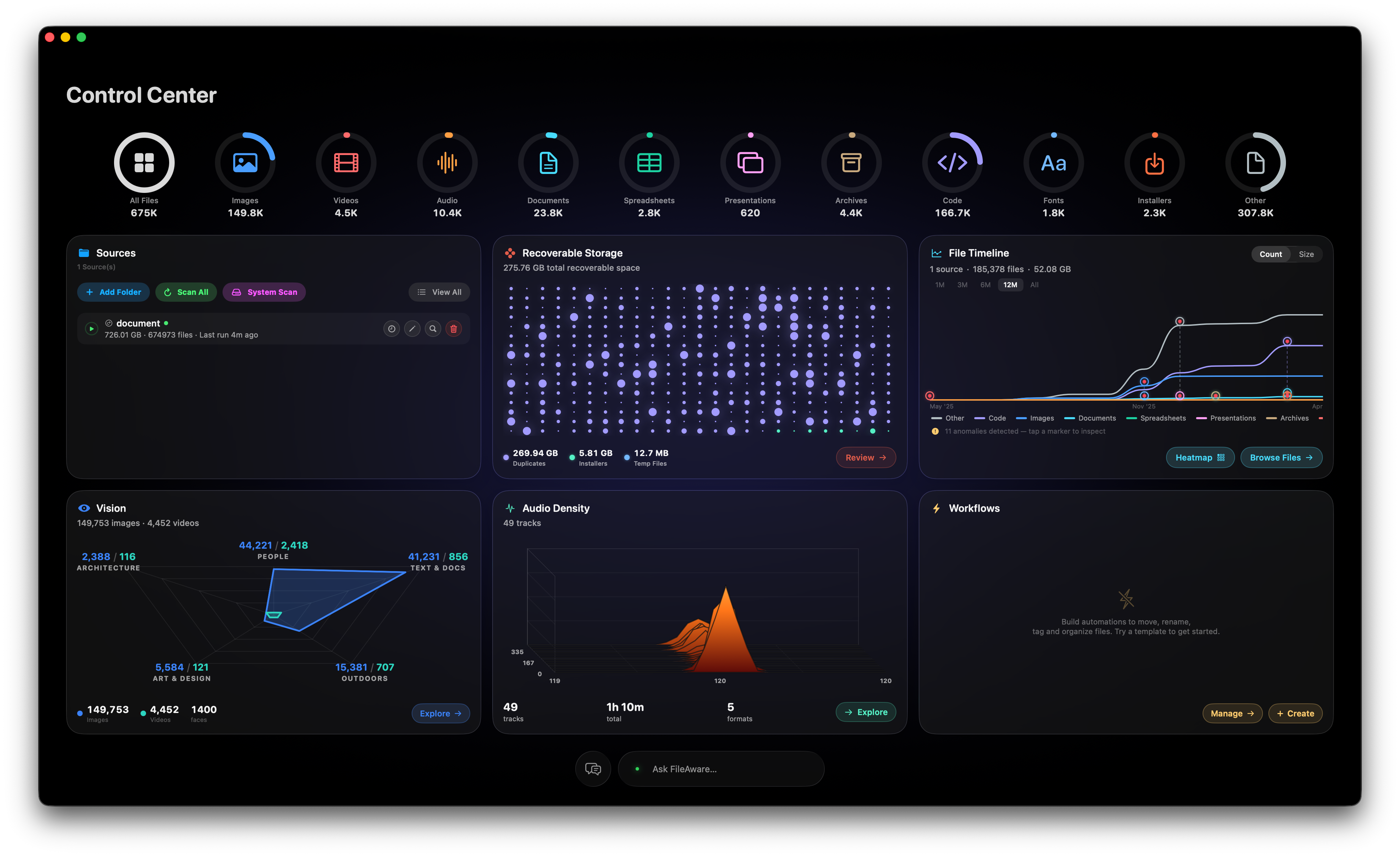
9 scanners. AI-powered search. Duplicate detection. Workflow automation. All running locally on your Mac — no cloud, no subscriptions.
FileAware scans, classifies, and organizes every file on your Mac using on-device AI — no data ever leaves your computer.
Find exact and fuzzy duplicates across all drives. Auto-select the best copies, preview side-by-side, and reclaim hundreds of gigabytes in a single click.
Ask questions in plain English. "What's taking up the most space?" — get instant answers from a local AI model running entirely on your Mac. Bring your own API key for cloud models.
Every image classified by on-device Vision AI. Browse by scene type — outdoors, people, architecture, food — with face detection and clustering.
Full music library with waveform visualization, inline playback, album art, BPM detection, and metadata editing. Browse by artist, album, genre, or codec.
Describe what you want in plain English — the AI builds a node-based workflow. Move, copy, rename, tag, and organize files on a schedule.
Interactive dashboard with file timelines, kind breakdowns, and recoverable space analysis. See exactly where your storage goes — by type, date, and folder.
FileAware runs a local AI model directly on your hardware. No cloud processing, no telemetry, no accounts. Your file data stays on your machine — always.
Optionally bring your own API key (OpenAI, Anthropic, Gemini, or Ollama) for more powerful responses — but the choice is always yours.
* Local AI model powered by Google Gemma, running on-device via Apple's MLX framework.
Tell the AI what you want in plain English. It generates a visual, node-based workflow you can review, customize, and schedule.
No. Everything runs locally on your Mac. The AI model runs on-device via Apple's MLX framework. No data is ever sent to any server unless you explicitly choose to use a cloud AI provider via BYOK (Bring Your Own Key).
FileAware requires macOS 26 (Tahoe) and an Apple Silicon Mac (M1 or later). The local AI model uses approximately 2.5 GB of disk space and runs efficiently on all Apple Silicon chips.
Yes. Add any mounted volume as a source folder — external drives, NAS mounts, USB drives. FileAware uses security-scoped bookmarks to maintain access across app launches.
FileAware uses SHA-256 hashing for exact duplicates (byte-identical files) and perceptual hashing for fuzzy duplicates (visually similar images). You can preview both files side-by-side before taking any action.
No. FileAware is a one-time purchase from the Mac App Store. All features — including the local AI model — are included. Cloud AI (BYOK) uses your own API keys at your own cost.
All of them. FileAware indexes images, videos, audio, documents, spreadsheets, presentations, code, archives, fonts, installers, and more. Specialized scanners extract metadata for each type.
Found a bug? Have a feature request? Just want to say hello? We'd love to hear from you.
Choose whatever works best for you. We read every message.
Last updated: July 3, 2026
FileAware processes everything on your Mac. We don't collect, transmit, or store any of your personal data. We don't have servers. We don't have accounts. We don't track you.
FileAware is a macOS app that scans, indexes, and analyzes files stored on your computer. It uses on-device machine learning to classify images, detect faces, label content, and answer natural language questions about your files. All of this processing happens locally on your Mac.
None. FileAware does not collect, transmit, or share any personal data, file contents, file metadata, usage analytics, crash reports, or telemetry of any kind. There is no account system, no registration, and no sign-in.
All file scanning, indexing, image classification, face detection, audio metadata extraction, duplicate detection, and AI-powered features run entirely on your Mac using local models and Apple frameworks. No data leaves your device for these features.
FileAware includes a local large language model (LLM) that runs on your Mac. The model is downloaded once during initial setup and runs offline thereafter. Your queries and file context are processed locally and are never sent to any external service.
FileAware offers an optional feature that allows you to connect your own API key for external AI providers (such as OpenAI or Anthropic) to power certain workflow automation nodes. If you choose to use this feature, your queries for those specific workflow nodes are sent to the provider you configure, subject to that provider's privacy policy. This feature is entirely optional and disabled by default. Your API key is stored locally in your app's sandboxed container and is never shared with us.
FileAware can optionally detect sensitive (NSFW) content in your photo library using Apple's on-device Sensitive Content Analysis framework. This analysis runs entirely on your Mac using Apple's built-in models. No images or results are transmitted externally. This feature requires you to enable Sensitive Content Warnings in macOS System Settings.
FileAware requests access to folders you choose and, optionally, Full Disk Access for system-wide storage analysis. File access is managed through macOS security-scoped bookmarks within the app sandbox. FileAware reads file metadata (names, sizes, dates, types) and, for supported media files, visual and audio content for classification. All data is stored in a local database within the app's sandboxed container on your Mac.
FileAware uses network access for two purposes only: downloading the local AI model on first launch, and, if you opt in, sending queries to an external AI provider via the Bring Your Own Key feature. No other network requests are made. There are no analytics endpoints, no tracking pixels, and no telemetry.
FileAware does not integrate any third-party analytics, advertising, or tracking services. The only third-party interaction occurs if you voluntarily configure the Bring Your Own Key feature, in which case you interact directly with the AI provider you choose.
All app data — your file index, face clusters, scan history, chat history, workflows, and preferences — is stored locally in the app's sandboxed container on your Mac. This data is not backed up to iCloud and is not accessible to other apps. Uninstalling FileAware removes this data.
FileAware does not collect any personal information from anyone, including children under 13. The app has no account system, no online features, and no data collection.
If we update this privacy policy, we will post the revised version at this URL with an updated date. Since we don't collect any contact information, we cannot notify you directly — we encourage you to check this page periodically.
If you have questions about this privacy policy, contact us at [email protected].